m (username removed) (log details removed) |
No edit summary Tag: 2017 source edit |
||
| Line 23: | Line 23: | ||
=== FontAwesome icons === | === FontAwesome icons === | ||
The exension [[Reference:FontAwesome|FontAwesome]] is bundled starting at BlueSpice version 4.3. In one of our next patches, we will add the possibility to use them in the Icon droplet. In the meantime, you can add FontAwesome icons with the <code><nowiki>{{#fas:...}}</nowiki></code> parser-function in source edit mode. [[mediawikiwiki:Extension:FontAwesome#Usage|See the official MediaWiki documentation]]. | The exension [[Reference:FontAwesome|FontAwesome]] is bundled starting at BlueSpice version 4.3. In one of our next patches, we will add the possibility to use them in the Icon droplet. In the meantime, you can add FontAwesome icons with the <code><nowiki>{{#fas:...}}</nowiki></code> parser-function in source edit mode. [[mediawikiwiki:Extension:FontAwesome#Usage|See the official MediaWiki documentation]]. | ||
== Icon-Auswahl == | |||
Hier finden Sie eine Auswahl von Icons mit Ihrem Klassennamen. | |||
=== Bootstrap Icons === | |||
https://icons.getbootstrap.com/ | |||
Diese Icons haben die Syntax <code>bi bi-<iconname></code>. | |||
<div style="display:flex; flex-wrap:wrap; gap:10px;"> | |||
<!-- Communication --> | |||
{{IconCard|envelope}} | |||
{{IconCard|chat-dots}} | |||
{{IconCard|telephone}} | |||
{{IconCard|megaphone}} | |||
{{IconCard|headset}} | |||
<!-- Buildings --> | |||
{{IconCard|building}} | |||
{{IconCard|bank}} | |||
{{IconCard|shop}} | |||
{{IconCard|hospital}} | |||
{{IconCard|house-door}} | |||
<!-- Commerce --> | |||
{{IconCard|cart}} | |||
{{IconCard|credit-card}} | |||
{{IconCard|cash-coin}} | |||
{{IconCard|receipt}} | |||
{{IconCard|piggy-bank}} | |||
{{IconCard|truck}} | |||
{{IconCard|box-seam}} | |||
<!-- Tools --> | |||
{{IconCard|wrench}} | |||
{{IconCard|hammer}} | |||
{{IconCard|tools}} | |||
{{IconCard|key}} | |||
<!-- People --> | |||
{{IconCard|person}} | |||
{{IconCard|people}} | |||
{{IconCard|person-badge}} | |||
{{IconCard|briefcase}} | |||
<!-- Business and general --> | |||
{{IconCard|calendar}} | |||
{{IconCard|clock}} | |||
{{IconCard|lightbulb}} | |||
{{IconCard|globe}} | |||
{{IconCard|shield-check}} | |||
</div> | |||
=== FontAwesome Icons === | |||
https://fontawesome.com/search?ic=free-collection | |||
Diese Icons haben die Syntax <code>fas-fa-<iconname></code>. | |||
<div style="display:flex; flex-wrap:wrap; gap:10px;"> | |||
<!-- Communication --> | |||
{{IconCardFA|envelope}} | |||
{{IconCardFA|comments}} | |||
{{IconCardFA|phone}} | |||
{{IconCardFA|bullhorn}} | |||
{{IconCardFA|headset}} | |||
<!-- Buildings --> | |||
{{IconCardFA|building}} | |||
{{IconCardFA|university}} | |||
{{IconCardFA|store}} | |||
{{IconCardFA|hospital}} | |||
{{IconCardFA|home}} | |||
{{IconCardFA|industry}} | |||
{{IconCardFA|warehouse}} | |||
<!-- Commerce --> | |||
{{IconCardFA|shopping-cart}} | |||
{{IconCardFA|credit-card}} | |||
{{IconCardFA|coins}} | |||
{{IconCardFA|receipt}} | |||
{{IconCardFA|piggy-bank}} | |||
{{IconCardFA|truck}} | |||
{{IconCardFA|box}} | |||
{{IconCardFA|chart-line}} | |||
<!-- Tools --> | |||
{{IconCardFA|wrench}} | |||
{{IconCardFA|hammer}} | |||
{{IconCardFA|tools}} | |||
{{IconCardFA|key}} | |||
<!-- People --> | |||
{{IconCardFA|user}} | |||
{{IconCardFA|users}} | |||
{{IconCardFA|id-badge}} | |||
{{IconCardFA|briefcase}} | |||
{{IconCardFA|handshake}} | |||
<!-- General --> | |||
{{IconCardFA|calendar-alt}} | |||
{{IconCardFA|clock}} | |||
{{IconCardFA|lightbulb}} | |||
{{IconCardFA|globe}} | |||
__FORCETOC__ | __FORCETOC__ | ||
Revision as of 15:11, 27 October 2026
PDF exclude - start
PDF exclude - end
Using the template
Bootstrap icons
- Find a bootstrap icon from the list of currently supported icons.
- Click on the icon you would like to use. The icon page shows you the class-name of the icon on the right side of the page:
- Highlight the class name (it has the format bi bi-myicon) and copy it to your clipboard (ctrl+c).
- Go back to your wiki page.
- Open the Droplets dialog in VisualEditor:
- Select the Icon-droplet:
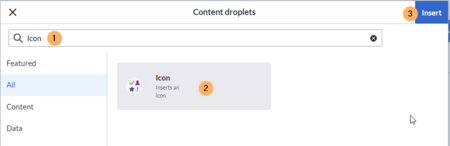
Selecting the icon droplet - Search for the droplet "Icon"
- Click on the Icon-card
- Click the Insert button
- Copy the icon class from your clipboard:
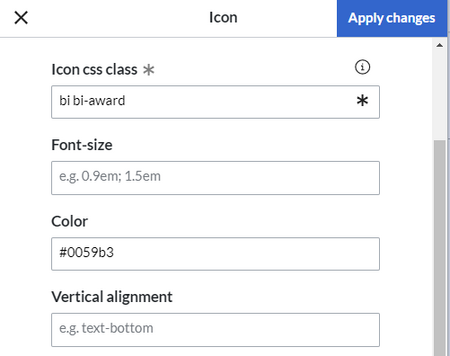
Template editor - Change the font size (optional) if you want the size to be different from the text surrounding it (e.g., from the size of a heading if the icon is placed in the heading or of the paragraph text if the icon is placed in the flow-text. Smaller than text icons are usually sized no smaller than 0.85em and larger icons up to 2.5em.
- Color: If you want the color to be different from the surrounding text, you can specify any web color (e.g., a color name like blue or a hex-valuesuch as #0059b3 for a more specific blue). A list of web colors can be found at https://www.w3schools.com/colors/colors_picker.asp
- Vertical alignment: It should not be necessary to provide an alignment value. The standard is set to text-top and usually works in headings and in flow-text. If it looks a little off, you can try other vertical-alignment values, such as text-bottom. For a full list of possible values, see https://www.w3schools.com/cssref/pr_pos_vertical-align.asp.
- Click Apply changes.


The icon is now displayed on the page.

FontAwesome icons
The exension FontAwesome is bundled starting at BlueSpice version 4.3. In one of our next patches, we will add the possibility to use them in the Icon droplet. In the meantime, you can add FontAwesome icons with the {{#fas:...}} parser-function in source edit mode. See the official MediaWiki documentation.
Icon-Auswahl
Hier finden Sie eine Auswahl von Icons mit Ihrem Klassennamen.
Bootstrap Icons
https://icons.getbootstrap.com/
Diese Icons haben die Syntax bi bi-<iconname>.
bi bi-envelopebi bi-chat-dotsbi bi-telephonebi bi-megaphonebi bi-headsetbi bi-buildingbi bi-bankbi bi-shopbi bi-hospitalbi bi-house-doorbi bi-cartbi bi-credit-cardbi bi-cash-coinbi bi-receiptbi bi-piggy-bankbi bi-truckbi bi-box-seambi bi-wrenchbi bi-hammerbi bi-toolsbi bi-keybi bi-personbi bi-peoplebi bi-person-badgebi bi-briefcasebi bi-calendarbi bi-clockbi bi-lightbulbbi bi-globebi bi-shield-checkFontAwesome Icons
https://fontawesome.com/search?ic=free-collection
Diese Icons haben die Syntax fas-fa-<iconname>.
fas fa-envelopefas fa-commentsfas fa-phonefas fa-bullhornfas fa-headsetfas fa-buildingfas fa-universityfas fa-storefas fa-hospitalfas fa-homefas fa-industryfas fa-warehousefas fa-shopping-cartfas fa-credit-cardfas fa-coinsfas fa-receiptfas fa-piggy-bankfas fa-truckfas fa-boxfas fa-chart-linefas fa-wrenchfas fa-hammerfas fa-toolsfas fa-keyfas fa-userfas fa-usersfas fa-id-badgefas fa-briefcasefas fa-handshakefas fa-calendar-altfas fa-clockfas fa-lightbulbfas fa-globe


