Created page with "== What are numbered headings? == MediaWiki does not display heading numbers for individual sections by default. If you want your wiki to use heading numbers, you can enable this in the Configuration Manager. == Configuration == Under "Content structuring", select the checkbox for NumberHeadings. {{#dpl: |title=Manual:Extension/BlueSpiceConfigManager |include=#NumberHeadings }} == Adjsut the scope == With this..." Tag: 2017 source edit |
No edit summary |
||
| Line 26: | Line 26: | ||
} | } | ||
</syntaxhighlight> | </syntaxhighlight> | ||
[[File: | [[File:page source.png|alt=Part of the page source with highlighted page name in the body tag|center|thumb|650x650px|Open the page source info via the browser context menu.]] | ||
{{Textbox|boxtype=important|header=Important!|text=Be aware of possible configuration overlaps with the [[Manual:Extension/BlueSpiceBookshelf#Configuration|Chapter numbering of page sections in books.]]|icon=yes}} | |||
[[Category:Organization]] | [[Category:Organization]] | ||
{{translation}} | {{translation}} | ||
Latest revision as of 11:29, 22 January 2026
What are numbered headings?
MediaWiki does not display heading numbers for individual sections by default. If you want your wiki to use heading numbers, you can enable this in the Configuration Manager.
Configuration
Under "Content structuring", select the checkbox for NumberHeadings.
- Enable heading numbering: Displays the numbering from the table of contents before the section headings on a page.
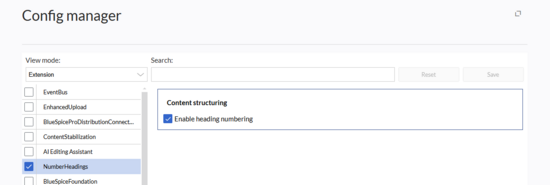
Number headings 
Activated heading numbers


Adjsut the scope
With this configuration setting enabled, numbered headings will be activated for the entire wiki.
Since this is not always appropriate in some namespaces or on some pages, you can override the setting via MediaWiki:Common.css.
/*Hide heading numbers */
.ns-3020 .mw-headline-number, /*Hide in namespace 3020 (find ID via namespace management)*/
.ns-3004 .mw-headline-number,
.ns-3006 .mw-headline-number,
.ns-3008 .mw-headline-number,
.ns-3010 .mw-headline-number,
.page-Terminology .mw-headline-number /*Hide on page "Terminology" (find page name via source code)*/

     {
       display:none
     }

Important!
Be aware of possible configuration overlaps with the Chapter numbering of page sections in books.



